Material Stock Setup Options for Stock Machining
The Material Stock routing node provides the following options:
Note: The length direction of the stock is the direction that is perpendicular to the recognized cross-section, which can be displayed by clicking the  Stock Form and Alignment button in the Component Viewer tool bar. For parts with rectangular stock, by default the height direction is along the smaller side of the cross-section and the width direction is along the longer side, although this can be modified using the Stock Form and Alignment window.
OD Stock Dimension
Specify the minimum allowance for the Outer Diameter of the part, or the total Outside Diameter. Applies to round bar and round tube stock only.
ID Stock Dimension
Specify the minimum allowance for the Inner Diameter of the part, or the total Inner Diameter. Applies to round tube stock only.
Stock Length Dimension
Specify the minimum allowance for the length direction of the stock, or the total length. Applies to bar stock only.
Stock Width Dimension
Specify the minimum allowance for the width direction of the stock, or the total width. Applies to square and rectangular bar stock only.
Stock Height Dimension
Specify the minimum allowance for the height direction of the stock, or the total height. Applies to square and rectangular bar stock only.
Stock Width Across the Flats Dimension (Hex Bar)
By default, Hex Bar stock has the same width (as measured across the flats of the hex) as the finished part. That is, aPriori assumes, by default, that hex features are designed to standard hex stock sizes and that those raw stock surfaces are left intact. In contrast, for round and rectangular stock, aPriori chooses a standard stock size that provides a non-zero stock allowance, so that all raw stock surfaces are machined away to produce the finished part.
For Hex Bar parts that are machined down from a larger stock, use this setup option to specify either a stock allowance or the absolute hex stock size.
See also Stock Machining and Hex Stock.
Plate Thickness
If Snap Up to a Standard Stock Height is set to true (the default in starting point Digital Factories), the plate stock thickness is the ideal thickness (see below). If Snap Up to a Standard Stock Height is set to true, the plate stock thickness is the smallest standard thickness greater than or equal to the ideal thickness.
By default, the ideal plate thickness is the sum of the following:
-
Height of the part’s cross-section
-
-
maxStockAllowance (3.175mm in starting point Digital Factories)
-
minStockAllowance (0.79375mm in starting point Digital Factories)
-
The percentage is specified by the cost model variable percentStockAllowance (5% in starting point Digital Factories).
With the setup option Plate Thickness (defined by the Material Stock process), users can override the default stock allowance or the deault total stock thickness. Specify one of the following:
-
Minimum allowance for the height direction of the stock: if you specify the minimum allowance, the ideal stock height is the sum of the following:
-
Height of the part’s cross-section
-
Twice the value you specified
-
The actual stock thickness depends on the ideal stock thickness and the setting of Snap Up to a Standard Stock Height, as described above.
-
Total thickness: if you specify the total thickness, the value is used as the actual stock thickness (and the setting of Snap Up to a Standard Stock Height is ignored).
Snap Up to a Standard Stock Height
The setup option Snap up to a Standard Stock Height (provided by the Material Stock process) affects aPriori ’s choice stock dimensions. This applies to the following stocks and dimensions:
-
Rectangular bar: height and width
-
Hex bar: width across flats
-
Round tube: inside diameter, outside diameter
-
Plate: stock thickness
-
Round bar stock: outside diameter
In what follows, size refers to one of the dimensions listed above.
If Snap up to a Standard Stock Height is set to true, aPriori selects actual stock with the smallest standard size greater than or equal to the ideal size (part size plus allowances) for the part (and only selects virtual stock if there is no such actual stock). The setup option Stock Unit System determines whether aPriori uses metric standard stock heights or US standard stock heights.
By default in starting point Digital Factories, Snap up to a Standard Stock Height is set to true for non-hex stock, and is set to false for hex stock--see Stock Width Across the Flats Dimension (Hex Bar).
Digital Factory Administrators can customize the default behavior with the cost model variable snapStockSize (which is true in aPriori starting point Digital Factories) and hexSnapStockSize (which is false in starting point Digital Factories).
Stock Unit System
determines whether to use metric standard stock height or US standard stock height, when stock selection snaps up to standard height (see the setup option Snap Up to a Standard Stock Height, above).
Plate Stock Length
If Roughing Technique for Plate Stock is set to All Bulk Milling (the default in starting point Digital Factories), the default plate stock length is the minimum settable plate stock length.
The minimum settable plate stock length is the sum of the following:
-
Length of the part’s bounding box
-
Two times the Perimeter Cutting Allowance for Plate Nesting
-
Two times the Sheet Length Trim Strip
If Roughing Technique for Plate Stock is set to Plate Cutting with Dropoff, the default plate stock length is specified by the cost model variable standardPlateLength (914.4mm in aPriori starting point Digital Factories), provided that the part length is no less than the minimum settable plate stock length (see above). If the value of standardPlateLength is less than the minimum settable plate stock length, then the default plate stock length is the minimum settable plate stock length.
If Roughing Technique for Plate Stock is set to Perimeter Milling with Dropoff, the default plate stock length is the smaller of the following:
-
Value of the cost model variable maxPlateLengthForNestedMilledParts (914.4mm in starting point Digital Factories)
-
Value of the cost model variable standardPlateLength (914.4 mm in aPriori starting point Digital Factories)
provided that the smaller of these two values is no less than the minimum settable plate stock length (see above). If the smaller of these two values is less than the minimum settable plate stock length, then the plate stock length is the minimum settable plate stock length.
With the setup option Plate Stock Length (defined by the Material Stock process), users can override the default on a per-part basis.
Plate Stock Width
If Roughing Technique for Plate Stock is set to All Bulk Milling (the default in starting point Digital Factories), the default plate stock width is the minimum settable plate stock width.
The minimum settable plate stock width is the sum of the following:
-
Width of the part’s bounding box
-
Two times the Perimeter Cutting Allowance for Plate Nesting
-
Two times the Sheet Width Trim Strip
If Roughing Technique for Plate Stock is set to Plate Cutting with Dropoff, the default plate stock width is specified by the cost model variable standardPlateWidth (457.2mm in aPriori starting point Digital Factories), provided that the part width is no less than the minimum settable plate stock width (see above). If the value of standardPlateWidth is less than the minimum settable plate stock width, then the default plate stock width is the minimum settable plate stock width.
If Roughing Technique for Plate Stock is set to Perimeter Milling with Dropoff, the default plate stock width is the smaller of the following:
-
Value of the cost model variable maxPlateWidthForNestedMilledParts (457.2mm in starting point Digital Factories)
-
Value of the cost model variable standardPlateWidth (457.2mm in aPriori starting point Digital Factories)
provided that the smaller of these two values is no less than the minimum settable plate stock width (see above). If the smaller of these two values is less than the minimum settable plate stock width, then the plate stock width is the minimum settable plate stock width.
With the setup option Plate Stock Width (defined by the Material Stock process), users can override the default on a per-part basis.
Part Orientation for Plate Nesting
If Roughing Technique for Plate Stock is set to Plate Cutting with Dropoff or Perimeter Milling with Dropoff, parts may be placed in a variety of orientations in order to maximize the number that will fit on the stock sheet. However, to satisfy grain-direction requirements, you can constrain the part to be nested only in specified orientations using the Material Stock process setup option Part Orientation for Plate Nesting. This allows you to specify an angle at which the contour should be rotated in order to align with the grain direction of the stock.
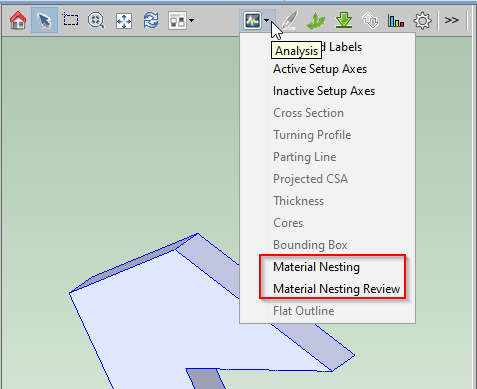
To review the nesting layout, select Material Nesting or Material Nesting Review from the Analysis icon in the Viewer, as shown below:
To assist with determining this angular value, a pair of blue and green axes is displayed on the Perimeter GCD which represents the contour of the part which is nested. The blue axis corresponds to an Orientation of 0 degrees pointing from the lower right corner of the nesting diagram toward the lower left corner; a positive angle will rotate the part in a clockwise direction as illustrated below.

Step Angle for Plate True-Part Nesting
The setup option Step Angle for Plate True-Part Nesting (defined by the Material Stock process) specifies the part rotations aPriori considers in order to optimize plate stock true-part shape nesting (see Roughing Technique for Plate Stock). aPriori considers non-negative, whole number multiples of this value that are less than 360 degrees. Specify one of the following:
-
Default value: 15 degrees in starting point Digital Factories. Administrators can customize the default with the cost model variable defaultPlateNestingStepAngle.
-
User override: user-specified value between 1 and 360 degrees.
Perimeter Cutting Allowance for Plate Nesting
If plate cutting or perimeter milling is the Roughing Technique for Plate Stock, the contour of the part can include an allowance of material removed by subsequent bulk milling. Perimeter Milling is used to cut the allowance-supplemented contour from the plate, and then bulk milling is assumed to remove the allowance of material.
The default margin depends on the plate cutting or perimeter milling process:
-
Laser Cut: value of the cost model variable defaultLaserPerimeterAllowance (10mm in starting point Digital Factories)
-
Plasma Cut: value of the cost model variable defaultPlasmaPerimeterAllowance (3.175mm in starting point Digital Factories)
-
Waterjet Cut: value of the cost model variable defaultWaterjetPerimeterAllowance (5mm in starting point Digital Factories)
-
OxyFuel Cut: value of the cost model variable defaultOxyFuelPerimeterAllowance (25mm in starting point Digital Factories)
-
Perimeter Cut: 1/3 the plate height
With the setup option Perimeter Cutting Allowance for Plate Nesting (defined by the Material Stock process), users can override the default on a per-part basis.
Part Spacing for True-Part Nesting
If plate cutting or perimeter milling is the Roughing Technique for Plate Stock, the contour of the part can include an allowance of material removed during plate cutting or perimeter milling.
The default margin depends on the plate cutting or perimeter milling process:
-
Laser Cut: product of stock height and the value of the cost model variable laserKerf (0.5 in starting point Digital Factories), bounded above by the value of the cost model kerfWidthMaxLaser (20mm in starting point Digital Factories)
-
Plasma Cut: product of stock height and the value of the cost model variable plasmaKerf (1.5 in starting point Digital Factories), bounded above by the value of the cost model kerfWidthMaxPlasma (30mm in starting point Digital Factories)
-
Waterjet Cut: product of stock height and the value of the cost model variable waterjetKerf (0.625 in starting point Digital Factories), bounded above by the value of the cost model kerfWidthMaxWaterjet (25mm in starting point Digital Factories)
-
OxyFuel Cut: product of stock height and the value of the cost model variable oxyfuelKerf (1 in starting point Digital Factories), bounded above by the value of the cost model kerfWidthMaxOxyFuel (44.45mm in starting point Digital Factories)
-
Perimeter milling: 1/3 the plate height
With the setup option Part Spacing for True-Part Nesting (defined by the Material Stock process), users can override the default on a per-part basis.
Sheet Length Trim Strip
The setup option Sheet Length Trim Strip specifies the size of the margin that runs along the width of plate stock on both sides (which effectively reduces the length of the sheet available for nesting). Specify one of the following:
-
Default value: The default margin depends on the plate cutting or perimeter milling process:
-
Laser Cut: value of the cost model variable defaultLaserPerimeterAllowance (10mm in starting point Digital Factories)
-
Plasma Cut: value of the cost model variable defaultPlasmaPerimeterAllowance (3.175mm in starting point Digital Factories)
-
Waterjet Cut: value of the cost model variable >defaultWaterjetPerimeterAllowance (5mm in starting point Digital Factories)
-
OxyFuel Cut: value of the cost model variable defaultOxyFuelPerimeterAllowance (25mm in starting point Digital Factories)
-
Perimeter milling: 1/3 the plate height
-
-
User override: user-specified margin.
Sheet Width Trim Strip
The setup option Sheet Width Trim Strip specifies the size of the margin that runs along the length of plate stock on both sides (which effectively reduces the width of the sheet available for nesting). Specify one of the following:
-
Default value: The default margin depends on the plate cutting or perimeter milling process:
-
Laser Cut: value of the cost model variable defaultLaserPerimeterAllowance (10mm in starting point Digital Factories)
-
Plasma Cut: value of the cost model variable defaultPlasmaPerimeterAllowance (3.175mm in starting point Digital Factories)
-
Waterjet Cut: value of the cost model variable defaultWaterjetPerimeterAllowance (5mm in starting point Digital Factories)
-
OxyFuel Cut: value of the cost model variable defaultOxyFuelPerimeterAllowance (25mm in starting point Digital Factories)
-
Perimeter Cut: 1/3 the plate height
-
-
User override: user-specified margin in millimeters.